Agent
You set the direction. The Powerbeat Agent manages the rules.
A Rule responds to deterministic conditions. A Policy coordinates state over time. Each Agent run records an investigation, while every Proposal remains a reviewable Rule change.
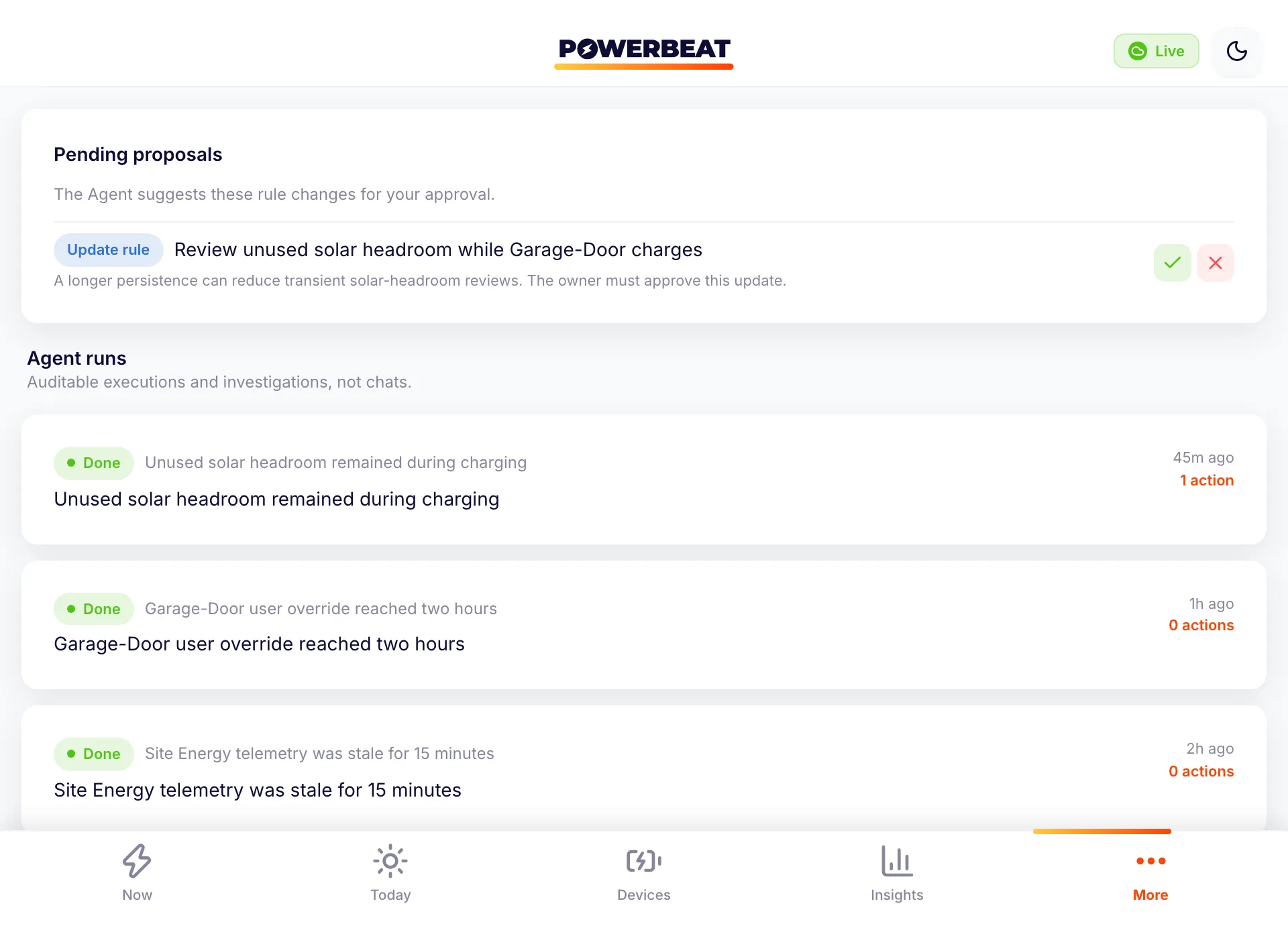
Deterministic demo inventory
Name each object before judging the automation.
These counts describe the prepared Powerbeat screens shown on this page, not a template library.
- Agent chats
- 0There is no chat object. The visible cards are Agent runs.
- Agent runs
- 3Each is an auditable execution or investigation.
- Enabled Rules
- 3Each has deterministic conditions and explicit actions.
- Pending Proposals
- 1It is a reviewable update to one existing Rule.
- Named rulesets
- 0Ruleset is shorthand in marketing copy, not a user-managed product object.
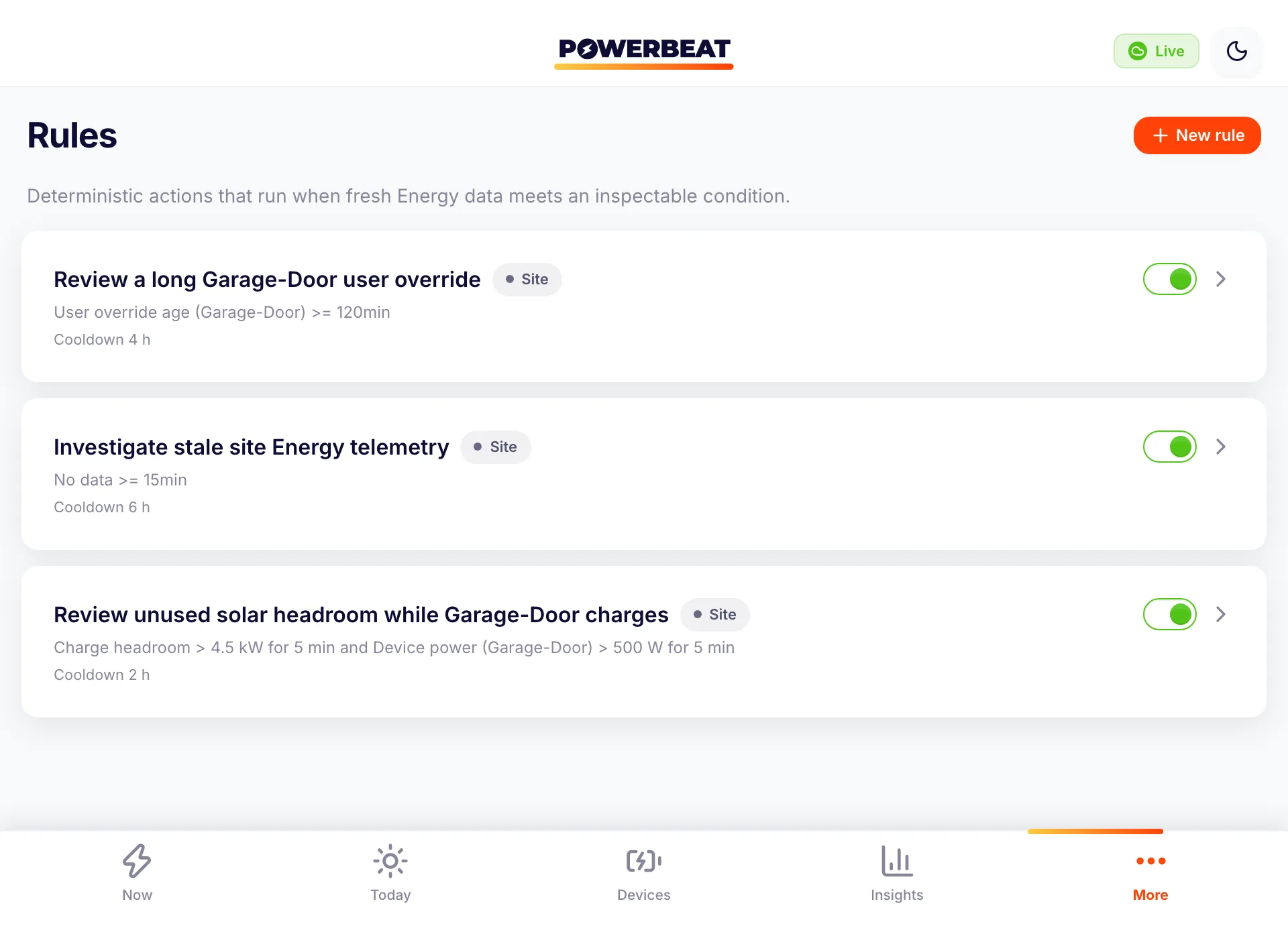
Rules
One condition. Explicit actions.
A Rule combines inspectable conditions, actions, persistence, and a cooldown. The demo Rules record an alert and explicitly wake the Agent; a notification-only Rule does not create an Agent run. Native push delivery is planned.
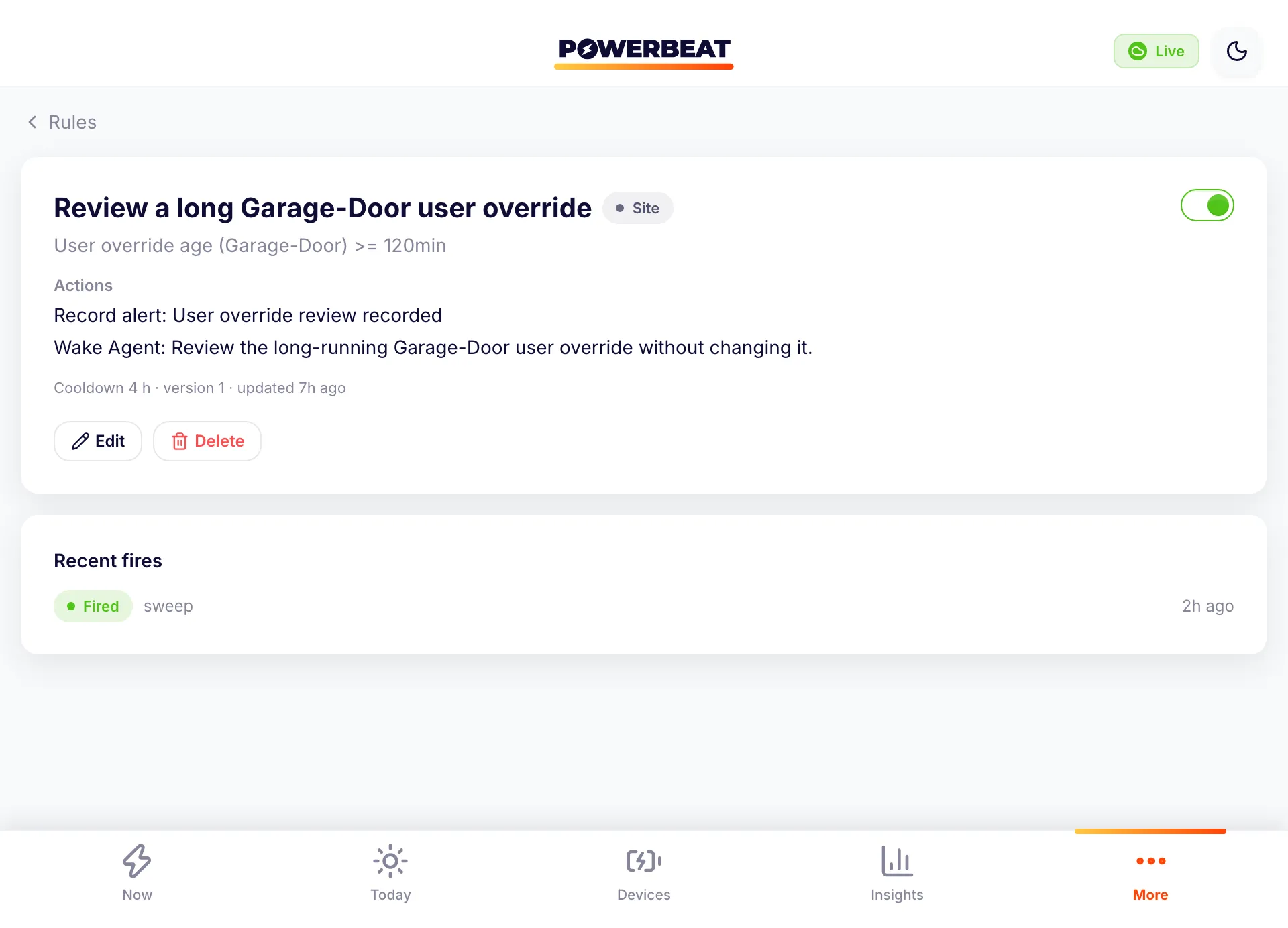
Powerbeat-recorded overrides
Respect the changes Powerbeat can see.
The demo Rule starts an Agent run when a user override recorded in Powerbeat remains unresolved for two hours. Powerbeat does not claim to detect a change made only in a vendor app when the connector does not report it.
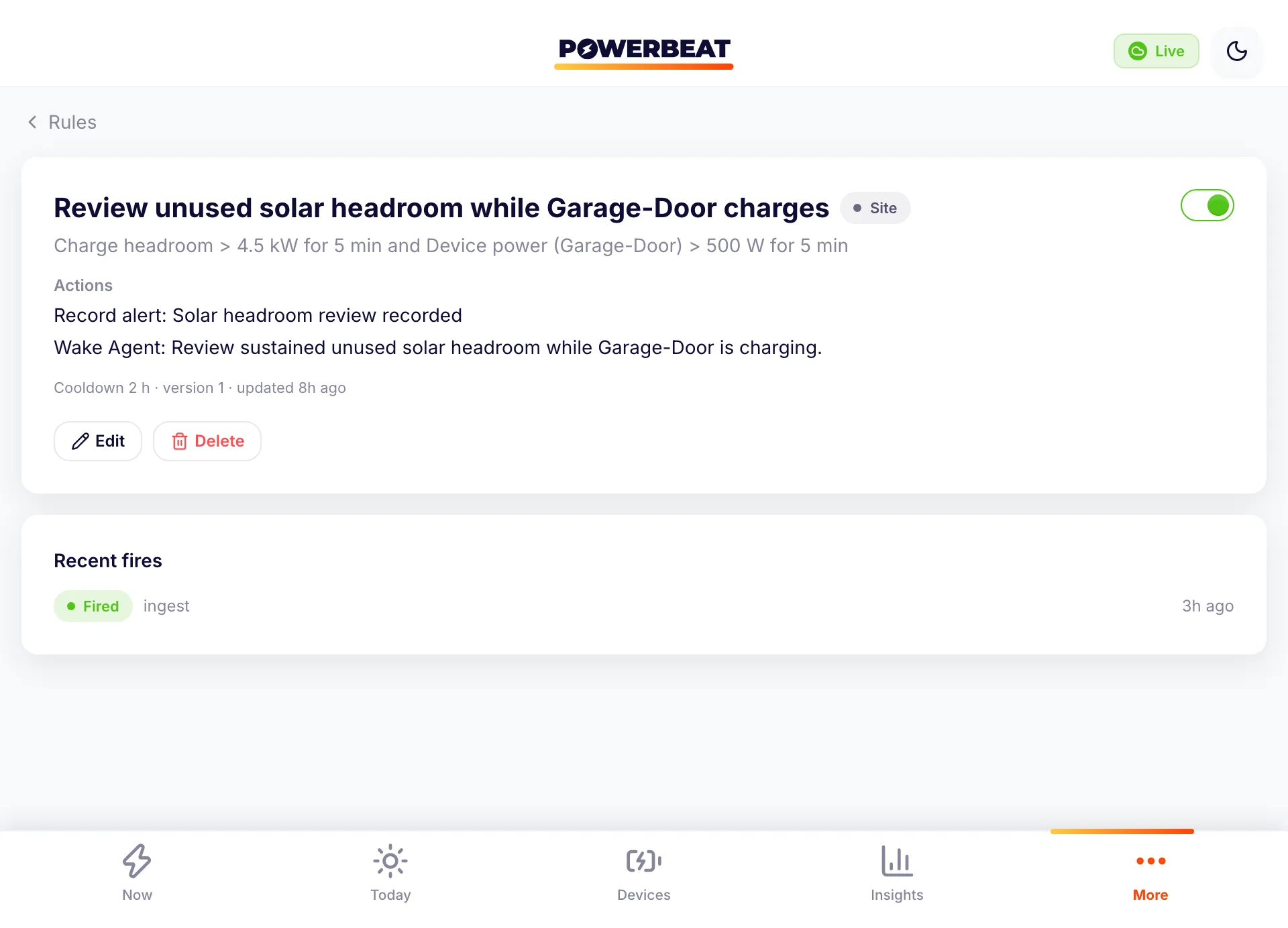
Agent runs and Proposals
Evidence first. A precise change second.
An Agent run is an auditable investigation, not a chat. A Proposal is a reviewable Rule creation, update, or deletion. In this demo, the proposed update changes solar-headroom persistence from 5 to 10 minutes and does not edit the Rule until an owner approves it.
Policy and authority
Stateful coordination needs explicit boundaries.
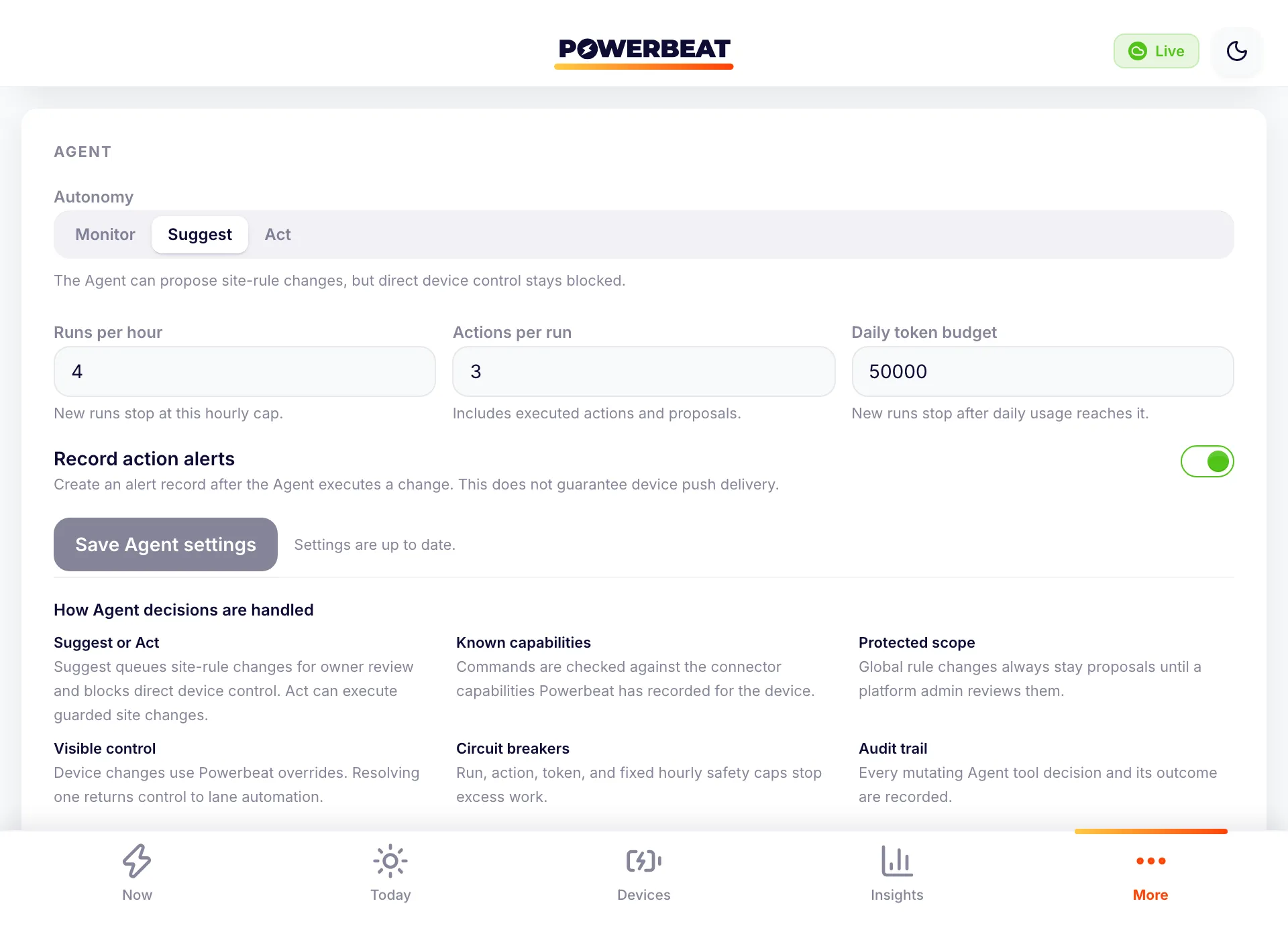
A Policy coordinates entry, exit, precedence, and restoration across multiple states. Owners choose Monitor, Suggest, or Act plus run, action, and token limits. Monitor leaves deterministic Rules active but suppresses Agent runs. Suggest blocks device control and proposes Rule changes; Act can execute allowed site actions without universal per-action approval. Connector capability checks, review of global Rules, Powerbeat-recorded overrides, circuit breakers, and audit entries still apply.
Rule and Policy ideas
Start with a real constraint, then make maturity visible.
Three ideas are configured in the deterministic demo. Supported ideas fit today's Rule and control model when a connector exposes the required data and controls. Planned ideas show direction and are not available Rules or Proposals. This is a marketing idea catalog, not a dashboard template library.
- Demo
- Configured in the deterministic screenshots
- Supported
- Expressible with today's model and supported capabilities
- Planned
- Direction only, not available as a Rule or Proposal
Featured ideas
- Detect unexpected one-phase charging with three-phase solar headroom
05 · Solar use
PlannedWhen a Wallbox configured for three phases charges on one phase while fresh solar headroom could sustain its minimum three-phase Power for 3 minutes, wake the Agent and notify selected site members. Missing or stale phase data cannot trigger it. Future delivery would add in-app history and use registered push devices with recorded delivery state.
Rule
- In summer, avoid intentional import and preserve 1 kW export when feasible
07 · Solar use
PlannedDuring owner-defined summer months, flexible loads avoid intentional grid Power and retain 1 kW of export when solar permits. Pause opted-in loads and alert when uncontrolled demand makes the target impossible.
Policy
- In winter, maximize PV use around a 100 W grid draw
08 · Solar use
PlannedDuring owner-defined winter months, modulate opted-in solar charging toward 100 W of grid import, accepting the nearest reachable Wallbox current step and a telemetry tolerance.
Policy
- Recover a parked EV from below 20% to 22%, using Powerwall first
12 · EV charging
PlannedStart below 20% vehicle SoC and stop at 22%. Use Powerwall discharge before grid Energy while respecting its active reserve and 4.6 kW whole-site limit. Household demand shares that limit, and grid Energy may finish the recovery.
Policy
- Prepare a supported Powerwall for severe weather
18 · Battery
PlannedUse an authoritative location-matched warning, control only Fleet-capable Powerwalls, preserve the prior vendor settings, and restore them after the warning clears.
Policy
- Use a configured cheap window and hold 30% until sunrise
19 · Tariffs
PlannedUse an owner-configured off-peak window, with 00:00 to 05:00 site-local time as the example, for opted-in flexible loads. Never lower an existing Powerwall reserve; hold at least 30% until astronomical sunrise.
Policy
- Ask the Agent to investigate stale site Energy telemetry
27 · Reliability
DemoWhen the site has no fresh Energy reading for 15 minutes, record an alert and wake the Agent, with a 6-hour cooldown.
Rule
- Review a user override that remains active for two hours
28 · Reliability
DemoWhen a user override recorded by Powerbeat remains unresolved for 120 minutes, record an alert and wake the Agent, with a 4-hour cooldown.
Rule
Browse all 28 ideas
- 01 Grid limits · Rule SupportedEase EV charging before reaching the site connection limit
Reduce a supported charger's current after total demand remains near the configured site limit.
- 02 Grid limits · Rule SupportedPause the lowest-priority charger at an emergency demand limit
Stop a supported charger when sustained site demand reaches an owner-set emergency threshold.
- 03 Grid limits · Rule SupportedResume charging only after sustained demand recovery
Restart a supported charger only after demand remains below a separate recovery threshold.
- 04 Grid limits · Rule PlannedAsk the Agent to review repeated evening demand peaks
Aggregate several evenings before starting an Agent run, instead of treating one peak as a pattern.
- 05 Solar use · Rule PlannedDetect unexpected one-phase charging with three-phase solar headroom
When a Wallbox configured for three phases charges on one phase while fresh solar headroom could sustain its minimum three-phase Power for 3 minutes, wake the Agent and notify selected site members. Missing or stale phase data cannot trigger it. Future delivery would add in-app history and use registered push devices with recorded delivery state.
- 06 Solar use · Rule DemoReview unused solar headroom while a Wallbox charges
When charge headroom stays above 4.5 kW while Garage-Door draws more than 0.5 kW for 5 minutes, record an alert and wake the Agent.
- 07 Solar use · Policy PlannedIn summer, avoid intentional import and preserve 1 kW export when feasible
During owner-defined summer months, flexible loads avoid intentional grid Power and retain 1 kW of export when solar permits. Pause opted-in loads and alert when uncontrolled demand makes the target impossible.
- 08 Solar use · Policy PlannedIn winter, maximize PV use around a 100 W grid draw
During owner-defined winter months, modulate opted-in solar charging toward 100 W of grid import, accepting the nearest reachable Wallbox current step and a telemetry tolerance.
- 09 Solar use · Rule SupportedRun a supported pool pump from sustained solar export
Switch on a supported relay after export stays above the pump's Power requirement.
- 10 Solar use · Policy PlannedReturn a flexible load to its previous schedule after surplus ends
Remember the prior state, use solar temporarily, then restore the earlier schedule without losing a user change.
- 11 EV charging · Policy SupportedReach an EV target before a weekday departure
Allocate supported charging Power against a vehicle target and a configured departure deadline.
- 12 EV charging · Policy PlannedRecover a parked EV from below 20% to 22%, using Powerwall first
Start below 20% vehicle SoC and stop at 22%. Use Powerwall discharge before grid Energy while respecting its active reserve and 4.6 kW whole-site limit. Household demand shares that limit, and grid Energy may finish the recovery.
- 13 EV charging · Rule PlannedAsk before using grid Energy for a nonessential EV top-up
Create a time-limited approval request before an optional charging target is allowed to import.
- 14 EV charging · Policy SupportedStart a second charger only from remaining site headroom
Allocate the second supported charger only after higher-priority demand and connection limits are accounted for.
- 15 Battery · Rule SupportedProtect the configured home-battery reserve
Pause supported flexible loads when battery SoC reaches the owner-set reserve.
- 16 Battery · Rule SupportedResume flexible loads after battery-reserve recovery
Restart supported loads only after battery SoC remains above a separate recovery threshold.
- 17 Battery · Rule SupportedFlag simultaneous grid import and battery charging
Record an alert when fresh readings show sustained grid import while the home battery is charging.
- 18 Battery · Policy PlannedPrepare a supported Powerwall for severe weather
Use an authoritative location-matched warning, control only Fleet-capable Powerwalls, preserve the prior vendor settings, and restore them after the warning clears.
- 19 Tariffs · Policy PlannedUse a configured cheap window and hold 30% until sunrise
Use an owner-configured off-peak window, with 00:00 to 05:00 site-local time as the example, for opted-in flexible loads. Never lower an existing Powerwall reserve; hold at least 30% until astronomical sunrise.
- 20 Tariffs · Policy PlannedRun flexible loads below an owner-set price ceiling
Coordinate opted-in loads from fresh tariff intervals while retaining their deadlines and site limits.
- 21 Tariffs · Policy PlannedUse negative-price hours without breaching site limits
Schedule opted-in demand during verified negative-price intervals without overriding connection, device, or reserve constraints.
- 22 Tariffs · Policy SupportedHold stored Energy for the evening peak
Use a supported battery reserve and time window to retain Energy for a known evening period.
- 23 Flexible loads · Rule SupportedHeat water from sustained solar headroom
Switch a supported heater relay after enough solar headroom remains available for a configured duration.
- 24 Flexible loads · Policy PlannedPreheat during the cheapest safe hours
Choose hours from tariff data while respecting a deadline, supported controls, and site Power limits.
- 25 Flexible loads · Rule SupportedShed a supported auxiliary heater before the connection limit
Switch off an opted-in relay load when sustained demand approaches its configured ceiling.
- 26 Flexible loads · Policy PlannedProtect an owner-set comfort floor while shifting load
Move flexible demand only while a fresh comfort signal remains inside the owner's permitted range.
- 27 Reliability · Rule DemoAsk the Agent to investigate stale site Energy telemetry
When the site has no fresh Energy reading for 15 minutes, record an alert and wake the Agent, with a 6-hour cooldown.
- 28 Reliability · Rule DemoReview a user override that remains active for two hours
When a user override recorded by Powerbeat remains unresolved for 120 minutes, record an alert and wake the Agent, with a 4-hour cooldown.
Authority questions
Know what is automatic and what waits for review.
Authority is explicit, and approval is not a blanket promise.
Can the Agent take actions without approval?
Yes. In Act mode, the Agent can execute allowed site actions without case-by-case approval. Suggest turns site Rule changes into owner-review Proposals and blocks direct device control. Global Rule changes always require platform-admin review.
What happens in Suggest mode?
The Agent can investigate, record alerts, and create Proposals for Rule changes. It cannot directly control a device. A Proposal changes a site Rule only after an owner approves it.
What still limits an Act-mode command?
The runtime checks the active device and the controls exposed by its connector, then applies action caps and command-specific safety checks. Mutating attempts are audited, and a Powerbeat-recorded override remains in force until it is resolved.
Selective private pilot
Set the direction for your home.
Register your account to discuss the Rules, Policies, and authority boundaries that matter to you.
A personal reply within two business days.